Website costs and planning
How much should a small business website cost in the UK?
In this guide
- The price isn't for a website, it's for a set of decisions
- What you'll pay once, and what you'll pay every year
- Why one quote is £300 and another is £3,000
- The three questions that make quotes comparable
- When a cheap website is the right choice
- When it's worth paying more
- Red flags in a website quote
- So, what should you budget?
You've asked three people for a website quote and got three answers that don't line up.
One says £300. One says £1,500. One says "it depends" and wants a call first.
None of them is necessarily lying. They're just pricing different things, and nobody has told you what the things are.
By the end of this guide you'll know what you're actually paying for, which costs come back every year, and how to put three different quotes side by side so you can compare them fairly.
Quick answer: A small business website in the UK can cost anything from nothing (a DIY builder on a free plan) to several thousand pounds (a custom site from an agency). For a typical sole trader or local service business, the useful question isn't "what's the going rate?" but "what does this quote include, what will I pay every year, and do I own what I'm paying for?"
A few questions you're probably already asking. I'll answer each one as we go:
- Why do quotes for "the same website" vary so much?
- What will I keep paying after the site goes live?
- How do I know if a cheap quote is a bargain or a trap?
The price isn't for a website, it's for a set of decisions
When someone quotes you for "a website", they're really quoting for a bundle of decisions. Most quotes differ because they've made different decisions on your behalf, often without saying so.
Here are the ones that move the price the most:
- How many pages. A one-page site and a ten-page site are different jobs.
- Who writes the words. Writing good copy takes time. Some quotes include it. Many assume you'll send it over.
- Bespoke design or a template. A template is quicker. A bespoke design is built around your business.
- What it's built on. A website builder you rent monthly, a WordPress site, or hand-written code you own outright.
- What happens after launch. Support, updates, fixes, and how long any of that lasts.
Two quotes can both say "five-page website" and still differ on every one of those five points.
What you'll pay once, and what you'll pay every year
This is the part most people don't hear until the first renewal email arrives.
The one-off costs
- Design and build. The main project fee.
- Copywriting, if it isn't included.
- Photography, if you need proper photos of your work, premises or team.
- Logo or branding, if you don't already have it.
The yearly costs
- Domain name. Your address, such as yourbusiness.co.uk. You renew it every year (or for several years at a time).
- Hosting. The server your site lives on.
- Website builder subscription, if your site is on a platform like Wix or Squarespace. This often includes hosting, but you keep paying it for as long as the site exists.
- Business email, if you want hello@yourbusiness.co.uk rather than a Gmail address.
- A care or maintenance plan, if you'd rather someone else handled updates, backups and small changes.
Write the yearly costs down separately. A quote that looks cheap up front can cost more over three years than one that looks expensive, once you add the monthly bills.
Worth checking: domain and hosting providers often advertise a low first-year price. Ask what the renewal price is, because that's what you'll pay from year two.
Why one quote is £300 and another is £3,000
Now we can answer the first question properly.
The gap usually comes from three places.
Who's doing the work. A freelancer working on their own has lower overheads than an agency with an office, account managers and a sales team. You're not necessarily getting a worse website from the freelancer. You're paying for fewer layers.
How much is included. One quote includes copywriting, five pages, analytics set-up and a month of support. Another includes three pages, your own words, and two weeks of support. Both are honest. They're different products.
What it's built on. Some sites take longer to build because they're written from scratch. Others take longer because they're heavily customised templates with lots of plugins. Neither is automatically better, but the build method affects speed, ongoing costs and how easy it is to move later.
For transparency, here's how I price my own work at Digital Rebuild. It's one set of numbers, not a market average:
| Package | Price | What's included |
|---|---|---|
| Basic | £299 one-off | Up to 3 pages, mobile-first design, contact form and Google Maps, basic SEO set-up, 14 days of support after launch |
| Starter | £499 one-off | Up to 5 pages, bespoke design, on-page SEO, Google Analytics 4 set-up, speed optimisation, 30 days of support after launch |
| Pro | Quoted per project | More pages, online shops, booking systems or custom integrations |
You can see the full details on the pricing section of the homepage. Other designers will price differently, and that's fine. The point is to know what each price buys.
The three questions that make quotes comparable
Here's the practical bit. When the quotes arrive, put them in a simple table with these three columns. It takes ten minutes and it'll tell you more than any sales call.
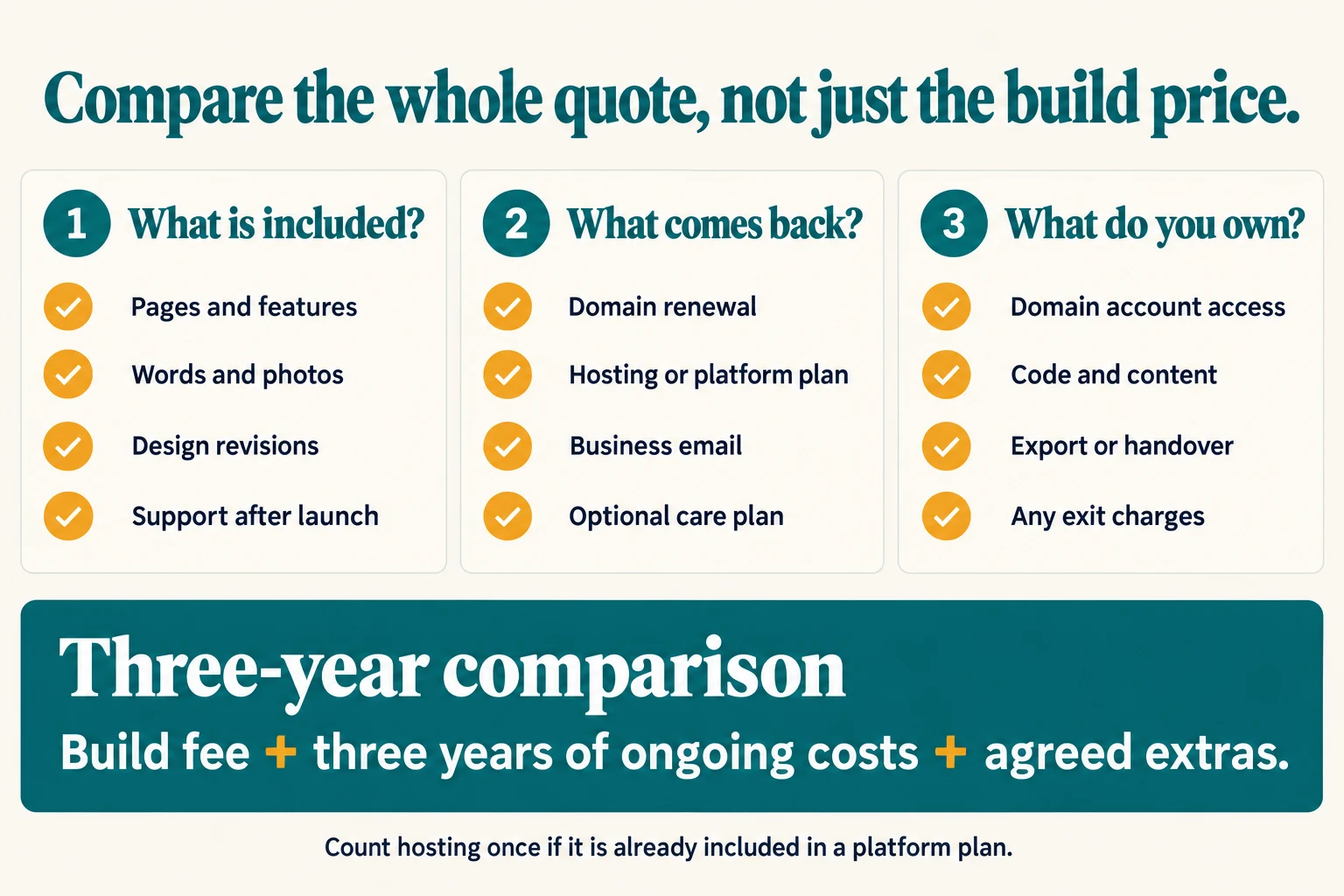
1. What exactly is included?
List the pages, the copywriting, the photos, the forms, the analytics, the support period and the number of revision rounds.
If a quote doesn't say, ask. "Does this include writing the text?" is a perfectly normal question, and the answer can change the real price by hundreds of pounds.
2. What will I pay every year, and to whom?
Ask each designer to list every ongoing cost: domain, hosting, platform subscription, email, plugins, and any care plan. Ask who each bill goes to.
You want to know whether you're paying the providers directly or paying the designer, who pays them for you. Both can work. You just need to know.
3. Who owns it, and can I leave?
This is the one people forget, and it matters most.
Ask:
- Will the domain be registered in my name, on my account?
- If I want to move the site to another designer or host later, what will I get?
- Is the site built on something I can take with me, or does it only exist on your platform?
A good answer sounds like: "The domain is in your name, you'll have the login, and if you leave I'll hand over everything." A worrying answer sounds vague.
When a cheap website is the right choice
Cheap isn't the enemy. For lots of small businesses, a small site done well is exactly right.
A cheaper website makes sense when:
- You need a clear online presence so people can check you're real and get in touch.
- Most of your work comes from word of mouth, and people look you up after hearing your name.
- You don't need an online shop, bookings or a customer login.
- You know what you want to say and can supply decent photos.
In that situation, three to five good pages that load quickly and make contacting you easy will often do more for you than a sprawling site nobody updates.
When it's worth paying more
Spending more is worth it when the website has a bigger job to do:
- You sell online. Shops need product pages, payments, delivery settings and testing.
- You take bookings. Calendars, reminders and payments add work.
- You're competing hard on Google. If customers search for what you do and pick from whoever shows up, more pages covering your services and areas can help. That takes more planning and writing.
- You need the words written for you. Good copy is a real cost, and it's often the difference between a site that gets enquiries and one that doesn't.
Red flags in a website quote
Most designers are decent people trying to do good work. But a few warning signs are worth knowing:
- The domain will be registered to the designer, not you. If you fall out, you could lose your web address.
- There's no clear answer to "what happens if I leave?"
- Ongoing fees aren't listed until after you've agreed.
- The site can't be moved, and the monthly fee never ends.
- Promises of guaranteed first-page Google rankings. Google itself says there's no way to request or pay for a better ranking in its local results. Nobody can honestly guarantee a position.
If you see one of these, it doesn't automatically mean walk away. It means ask more questions before you sign.
So, what should you budget?
Rather than giving you a made-up "average", here's how to work out your own number:
- Decide what the site must do: be found, explain your services, get calls and emails, take payments, take bookings.
- Count the pages you need. Most local service businesses need a home page, a services page or two, an about page and a contact page.
- Decide whether you'll write the words yourself.
- Get two or three quotes and fill in the three-column table above.
- Add up the first-year cost and the three-year cost for each.
The three-year figure is usually the most honest comparison. It shows the real price of a cheap build with a pricey subscription, or a pricier build with low running costs.
And remember the last question from the start: is a cheap quote a bargain or a trap? It's a bargain if it covers what you need, the yearly costs are clear, and you own what you've paid for. It's a trap when any one of those is missing.
Common questions
How much does a basic small business website cost in the UK?
It depends on who builds it and what is included. My own fixed prices are £299 for up to three pages and £499 for up to five pages with bespoke design and Google Analytics set up. Other designers price differently, so compare what each quote includes, not just the headline number.
Are there ongoing costs after a website is built?
Yes. At minimum you pay for the domain name and hosting every year. You may also pay for a website builder subscription, an email service, or a care plan if you want someone else to handle updates and security.
Is a cheap website a false economy?
Not always. A small, well-built site that answers customers' questions and makes it easy to contact you can outperform an expensive one. The false economy is paying for something you can't change, can't move, or that hides who owns the domain.